Understanding HNSW: The Engine Behind Fast Vector Search
To understand HNSW, imagine walking into a library with millions of books, looking for a specific book based on a brief description of the content. If the books were all piled up randomly, you'd have to check every book individually to find the one that matches your description best, that's brute force. While it would eventually work, it would take forever.
But libraries aren't organized like that. They're structured to naturally guide you to the right section. You walk in and at the top level, you choose whether your book is in the fiction or nonfiction section. Then you narrow it down by genre history, science, or biography. After that, you move to more specific subcategories or alphabetical order until you reach the exact shelf where your book is located.
HNSW works the same way and that intuition is worth holding onto as we go deeper.
HNSW Indexing
HNSW (Hierarchical Navigable Small World) is a graph-based indexing algorithm used for Approximate Nearest Neighbor (ANN) search in high-dimensional vector spaces. Instead of comparing a query against every vector, HNSW organizes vectors into a hierarchical graph structure that enables fast navigation to the nearest neighbors.
The Building Blocks of HNSW
HNSW combines ideas from two powerful data structures: Navigable Small World (NSW) graphs and Skip Lists.
Navigable Small World (NSW)
A Navigable Small World is a type of network or graph that allows for efficient navigation and search through its nodes.
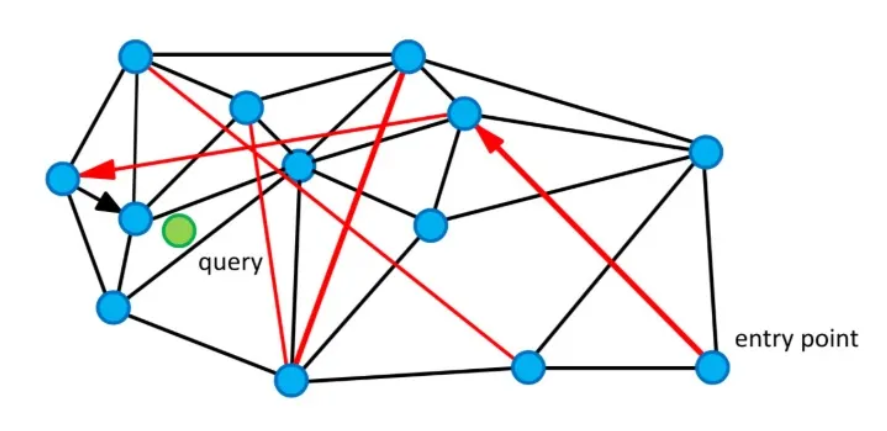
Structure
- Nodes represent data points (e.g., vectors)
- Edges represent connections between these points based on similarity
How NSW Search Works
- Each node is connected to other similar nodes
- The search starts from an entry point
- The algorithm repeatedly moves to neighboring nodes that appear closer to the query
- This allows efficient navigation instead of comparing the query against every vector
Limitation
Pure NSW can become trapped in local optima because it relies on greedy navigation. HNSW reduces this risk by using hierarchical layers and maintaining multiple candidate paths during search.
Skip Lists
A Skip List is a data structure that allows fast search, insertion, and deletion operations. It is essentially a multi-level linked list where each level allows "skipping" over multiple elements, reducing the time complexity of operations.
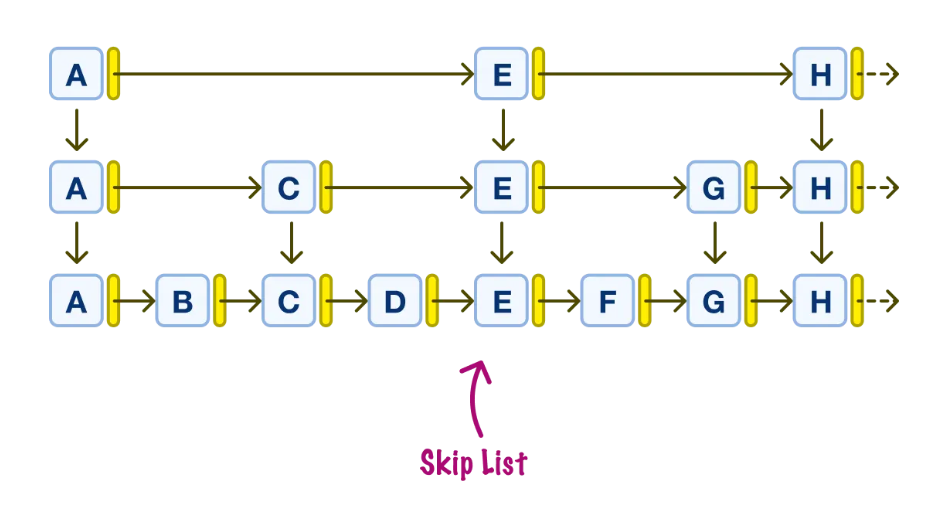
How Skip Lists Work
- Data is organized into multiple levels
- Higher levels contain fewer elements and act as shortcuts
- Instead of traversing everything step by step, the search can use these shortcuts to quickly reach the correct region
- Once near the target, the search switches to lower, more detailed levels
How HNSW Combines Both Ideas
HNSW merges these two concepts into a single structure:
- Uses the graph-based navigation of NSW to move between similar vectors
- Uses hierarchical layers inspired by Skip Lists to avoid getting trapped in poor search paths
- Higher layers provide a coarse overview of the dataset and help quickly locate the most promising region
- Lower layers contain denser connections that enable precise nearest-neighbor search
How Search Works in HNSW
The search process follows a top-down approach. Instead of starting with the full graph, the algorithm begins at the highest layer and gradually moves toward lower layers, refining its search at each step.
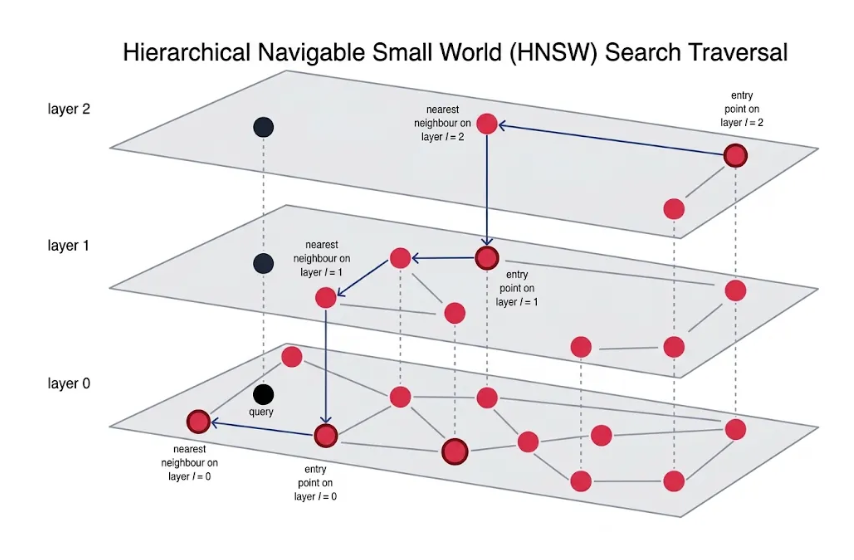
Finding the Right Region
The search starts at the topmost layer, which contains only a small subset of all vectors. Because there are very few nodes and connections, this layer provides a coarse overview of the dataset.
What happens here
- Start from the entry point
- Compare the query vector with the current node and its neighbors
- Move to a neighboring node if it is closer to the query
- Repeat until no neighboring node is closer than the current node
The closest node found here becomes the entry point for Layer 1.
Refining the Search
Layer 1 contains more nodes and connections than Layer 2, providing a more detailed view of the dataset.
What happens here
- Begin from the entry point passed down from Layer 2
- Continue the greedy search process
- Move to neighboring nodes whenever a closer one is found
The closest node found here becomes the entry point for Layer 0.
Fine-Grained Search
Layer 0 is the bottom layer and contains every vector in the dataset. It has the highest number of nodes and connections, making it the most detailed representation of the data.
What happens here
- Start from the entry point received from Layer 1
- Explore nearby nodes within the most promising region
- Continue moving toward vectors that are increasingly similar to the query
The algorithm reaches the nearest neighbor (or top-k nearest neighbors) and these are the final results.
How Vectors Are Inserted into HNSW
Understanding how vectors are inserted is just as important as understanding how search works. The quality of the graph built during insertion directly determines how accurate and fast your searches will be later.
Step 1: Assigning a Maximum Layer
When a new vector arrives, HNSW first decides how high up in the hierarchy it will live. This is done by randomly drawing a maximum layer number using an exponential probability distribution. The result:
- Most vectors are assigned only to Layer 0
- Fewer vectors reach Layer 1
- Very few vectors reach Layer 2 or higher
This randomness is intentional because it's what naturally keeps upper layers sparse and lower layers dense, maintaining the hierarchical structure that makes HNSW fast.
Step 2: Finding the Entry Point (Top Layers)
Starting from the topmost layer of the graph, HNSW runs a greedy search, identical to the query search described earlier, moving toward nodes closest to the new vector. This phase has one goal: find the best entry point for the layer where insertion will actually happen. At each layer above the vector's assigned maximum, HNSW tracks only the single closest node and passes it down. No connections are formed yet.
Step 3: Selecting Neighbors (Insertion Layers)
Once HNSW reaches the vector's assigned maximum layer, the process changes. Instead of tracking just one candidate, it now tracks up to ef_construct candidates simultaneously. From these, HNSW selects the best m neighbors and creates bidirectional edges. This same process repeats going down through each layer until Layer 0.
This is the moment where the parameters you configure actually matter:
ef_constructcontrols how many candidates are evaluated when choosing neighbors. A higher value means more options are considered, leading to better neighbor selections and a higher quality graph.mcontrols how many of those candidates actually become permanent connections. More connections means more paths available during future searches.
ef_construct controls.
This is also why
ef_construct is a build-time parameter and cannot be adjusted at query time. Once the graph is built, the connections are fixed. If you build with a low ef_construct, you are stuck with a lower quality graph regardless of how high you set hnsw_ef at search time.
Why This Is Efficient
The key idea is that the upper layers act like shortcuts. Instead of searching the entire graph from the beginning, HNSW quickly identifies the correct region at higher levels and then performs increasingly detailed searches as it moves downward. Think of it like finding a book in a library:
- Layer 2 helps you find the correct floor
- Layer 1 helps you find the correct section
- Layer 0 helps you locate the exact shelf and book
By narrowing the search space at each layer, HNSW achieves extremely fast nearest-neighbor search while maintaining high accuracy.
Configuring HNSW
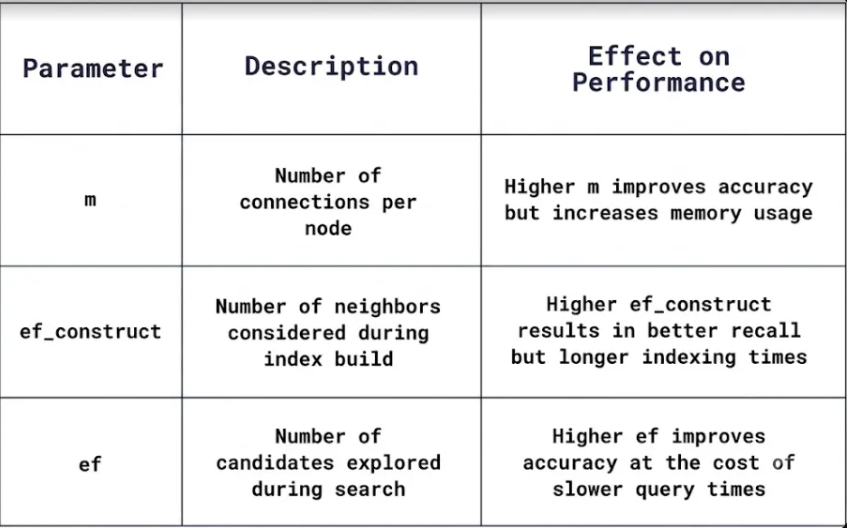
You can fine-tune how the HNSW graph is built to balance search speed, accuracy, memory usage, and indexing time depending on your use case. There are three key parameters: m, hnsw_ef, and ef_construct.
| Parameter | Controls | Typical Range |
|---|---|---|
| m |
Graph connectivity. Maximum number of connections per node. Higher m = denser graph, better accuracy, more memory. Lower m = sparser graph, faster insertion, lower accuracy.
|
8 – 64 |
| ef_construct | Build thoroughness. Candidates evaluated during insertion. Higher = more comprehensive graph, slower indexing. Lower = faster insertion, less optimal connections. | 100 – 500 |
| hnsw_ef | Search thoroughness. Candidates evaluated during a query. Higher = more accurate results, slower queries. Lower = faster search, potentially less accurate. Tune this at query time. | 50 – 200+ |
Why HNSW Is Fast and Scalable
Sublinear Search Scaling
Unlike O(N) brute force search, HNSW search grows roughly logarithmically with the number of vectors. This makes million-scale datasets searchable in milliseconds rather than minutes.
Filter-Aware
Qdrant extends HNSW with filter-aware indexing (Filterable HNSW), allowing fast searches under structured conditions. This avoids costly full scans when filtering by metadata.
Large-Scale Use
- Supports real-time updates while maintaining high recall
- Fits semantic search and recommendation systems
- Scales from thousands to billions of vectors